
Key Business Elements
Easily manage warehouses, employees, and costs across teams and departments. From chaos to clarity, developed with real users in mind, ready for growth.
Pricing and PlansDigital warehouse
Effective warehouse management is crucial for any construction, assembly, or service company. With the Warehouse module in RelayPlan, you gain full visibility of all material movements, from central storage to personal inventories and project locations. Every piece of equipment or material is traceable, preventing losses, incorrect transfers, or misuse. With a modern approach to digital tracking, you reduce bureaucracy, save time, and always have all data at your fingertips—even on-site, from home, or abroad.
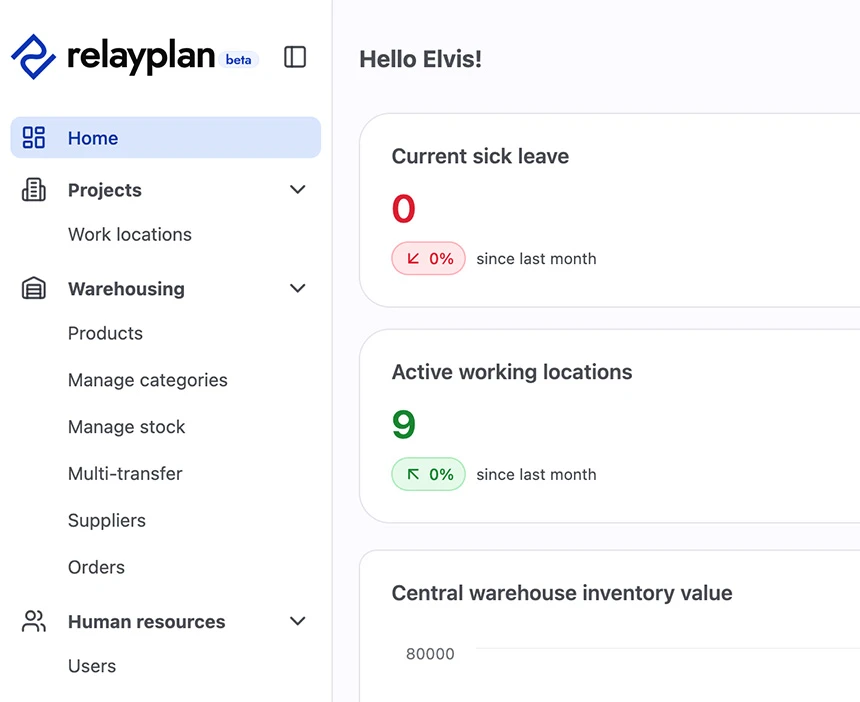
Warehouse capabilities
Review a list of all items in the warehouse and filter by category, project, or user. Enter a new material receipt or issue slip for a specific project. View the item’s movement history, including who took it and where it was assigned. You can also scan the product code to check its location, quantity, and movement. Establish links between the warehouse and orders to detect material shortages in time.
Project and cost center management
Each project has its own timeline, deadlines, requirements, and costs. The Projects module allows centralized management of all activities in one place, from initial preparation and allocation of stock and resources to tracking costs, hours, and inventory. With a clear structure, responsibilities, and linked data, you can act on time and optimize resources. This reduces administrative burden and improves communication between departments and field teams.
Project capabilities
Create a new project with a name, address, code, and status. Link the project with orders and inventory so the system automatically alerts you when materials run low. Review the project status and continuously compare planned consumption with actual usage. The visual progress display provides a quick overview of each project’s status.
Overview of employees
The HR management module provides a comprehensive view of your team, from basic information, contracts, skills, and roles, to availability, absences, and work history. The system also supports recording safety training, medical check-ups, and vacations. Digitizing these processes reduces the need for time-consuming searches through documents, notifies you of document validity, and increases legal compliance and internal organization.
Capabilities of the HR
Select an employee from the list and view their profile. Access basic information, active and past contracts, including start and end dates. Review entered vacations and reminders. Add certificates. Add notes or internal changes to contracts. Using filters, you can, for example, identify all employees with expiring contracts or missed medical check-ups and review assigned personal resources.
Assignment management
Modern field operations require precise and transparent management of assignments, whether it involves work tasks or temporarily relocating employees to another site. The Assignments module allows easy planning and tracking of all types of assignments, providing greater operational efficiency and more control over task execution. Assignments are linked to employees, projects, locations, hours, and resources. The system enables digital communication, eliminating paper documentation, reducing the number of calls, and minimizing the possibility of errors. With this module, the traceability of work and reliability of execution are increased.
Capabilities of the assignments system
Create a new assignment for a selected employee or team at a specific cost center. Set the date, location, and project. The system automatically synchronizes completed hours with the project and HR module and allows the generation of reports by location and employee.
Working time records
Tracking employee hours can be simple, automated, and paperless. The system allows recording of arrivals, departures, breaks, sick leave, and overtime. Integration with the mobile app enables employees to "clock in" even from remote locations. At the same time, project managers can allocate work in real time, making planning and later payroll processing easier. This ensures you always have accurate data for salary calculations, audits, or internal reporting.
Capabilities of the time tracking system
Employees record their arrival, break, and end of work via the mobile app. The system automatically calculates the total time, including breaks. It links this data to the project record and generates a summary of hours worked per task. At the end of the month, exporting the data provides all necessary information for payroll, including overtime, holidays, sick leave, and vacations.
Inventory counting and stock transfers
Monitoring the actual state of materials is crucial for smooth business operations. The Stock module allows precise tracking of all items across different locations, including spare parts, small materials, and tools. The system records quantities, locations, purchase and sale prices, and serial numbers if necessary. With support for inventory checks, you can quickly detect discrepancies and ensure stock accuracy.
Capabilities of the stock transfer
Open the inventory list for the main warehouse or a specific personal stock. Review items that are below minimum stock levels. Print the list or export it. During inventory, manually enter new quantities or import them from a spreadsheet. View movement history for a specific item or filter by projects to see where the material was used. Manage personal stock, which employees can view via the mobile app.
Ordering materials and equipment
The orders module enables systematic management of the entire procurement process, from detecting a need, preparing and approving a purchase order, to receiving and posting materials in the warehouse. With automatic integration with stock levels, the system suggests orders when it detects shortages. This helps avoid project delays and duplicate orders. The process is fully digital and traceable, with the option to export for accounting or suppliers.
Capabilities of the stock transfer
Create a new order with a list of products and quantities. Select a supplier and link the order to a specific project or warehouse. Upon approval, a PDF purchase order is generated and sent with the order. Once materials are received, assign them to the warehouse, add them to inventory, and mark as “received.” Order statuses are always visible in the system, making coordination easier.
Fleet management
Effective warehouse management is crucial for any construction, assembly, or service company. With the warehouse module in RelayPlan, you get full visibility of all material movements, from the central warehouse to personal inventories and project locations. Every piece of equipment or material is traceable, preventing losses, incorrect transfers, or misuse. With a modern approach to digital tracking, you reduce bureaucracy, save time, and always have all data at your fingertips—even on-site, from home, or abroad.
Capabilities of the fleet
Review the list of vehicles with basic information: brand, license plate, type, and registration date. View usage history and assign a vehicle to a specific employee for a defined period. The system sends reminders for upcoming inspections or registrations. Enter service or insurance costs and track annual expenses per vehicle. For major expenses, the system suggests replacement or an additional evaluation of cost-effectiveness.

For everyone who is tired of restrictions, complicated systems, licenses, and lost information, here is a simple start and a long-term solution.
Start free

Not enough?
Request an agent!
Our agent will give you a live demonstration of the system and show how you can simplify work and save time and costs.
Order now